
Everything your agency needs to go from brief to published N/A
without switching tools.
Geo Dash replaces your keyword tool, AI writer, image generator, content library, and project manager with one pipeline built for agencies. Research → Generate → Review → Publish: in minutes, not days. No Claude, OpenAI, or Gemini API keys required.
50+ articles/hr
With bulk generation
3×
More keywords discovered
< 5 min
Onboarding per client
Features grouped by what they do for you
Not alphabetical. Not by technical category. By the outcome you actually care about.
Publish 3× faster
- AI article generation from enriched briefs50+ articles/hr
- Bulk generation: up to 50 articles in one batchParallel processing
- Content templates with locked tone & structure
- Export as Markdown or HTML for any CMS
“I used to spend 4 hours on a single client blog post. Now my team produces 15 per week.”
: Sarah Jenkins, Founder & CEO, Velocity Agency
Rank for more keywords
- AI keyword clustering: 300+ results per search with volume, difficulty, CPC, and intent300+ keywords/search
- Enriched briefs with questions to answer, article angles, and SERP gaps
- Internal linking recommendations per articleNo manual silo-building
- Geo-targeted filtering by location, language, and state
“We used to spend a full day on keyword research per client. Now it's 20 minutes.”
: Daniel Brooks, Content Director, Northline Media
Manage every client from one place
- Multi-client workspaces: isolated brand voices, keywords, and libraries per client
- Client brand profiles: zero briefing calls per new client0 briefing calls
- Role-based access: writers, editors, clients, separated
- Approval gates: nothing publishes before sign-off
“We manage 12 clients and Geo Dash cut our content fulfillment time by 40%.”
: Sarah Jenkins, Founder & CEO, Velocity Agency
Publish without the friction
- WordPress integration: push directly from the library
- Export as Markdown or HTML for any CMS
- Editorial review flow with status tags and draft stages
- Client review access: view-only or editor permissions
Look professional from day one
- AI-generated context-aware article images: no more stock photo sourcing
- Content library with SEO scores, word counts, and performance status
- Organized folders and archiving per client
- One-click export for polished deliverables
“The enriched briefs eliminated our entire content planning bottleneck.”
: Ayesha Khan, Head of Growth, Orbit Commerce
From zero to published in 3 steps
No onboarding calls. No 47-step wizard. No “schedule a demo to see how it works.”
Connect your client
Set up a workspace with their brand voice, tone, and keywords in under 2 minutes. Import existing content or start fresh.
Research & generate
Find high-ROI keywords, see competitor gaps, enrich into briefs, and generate articles with images: all in one flow.
Review & publish
Approve in the library, export as Markdown/HTML, push to WordPress, or share for client review. Done.
See it in action
No demo call required. Here’s what happens when you click “Generate.”
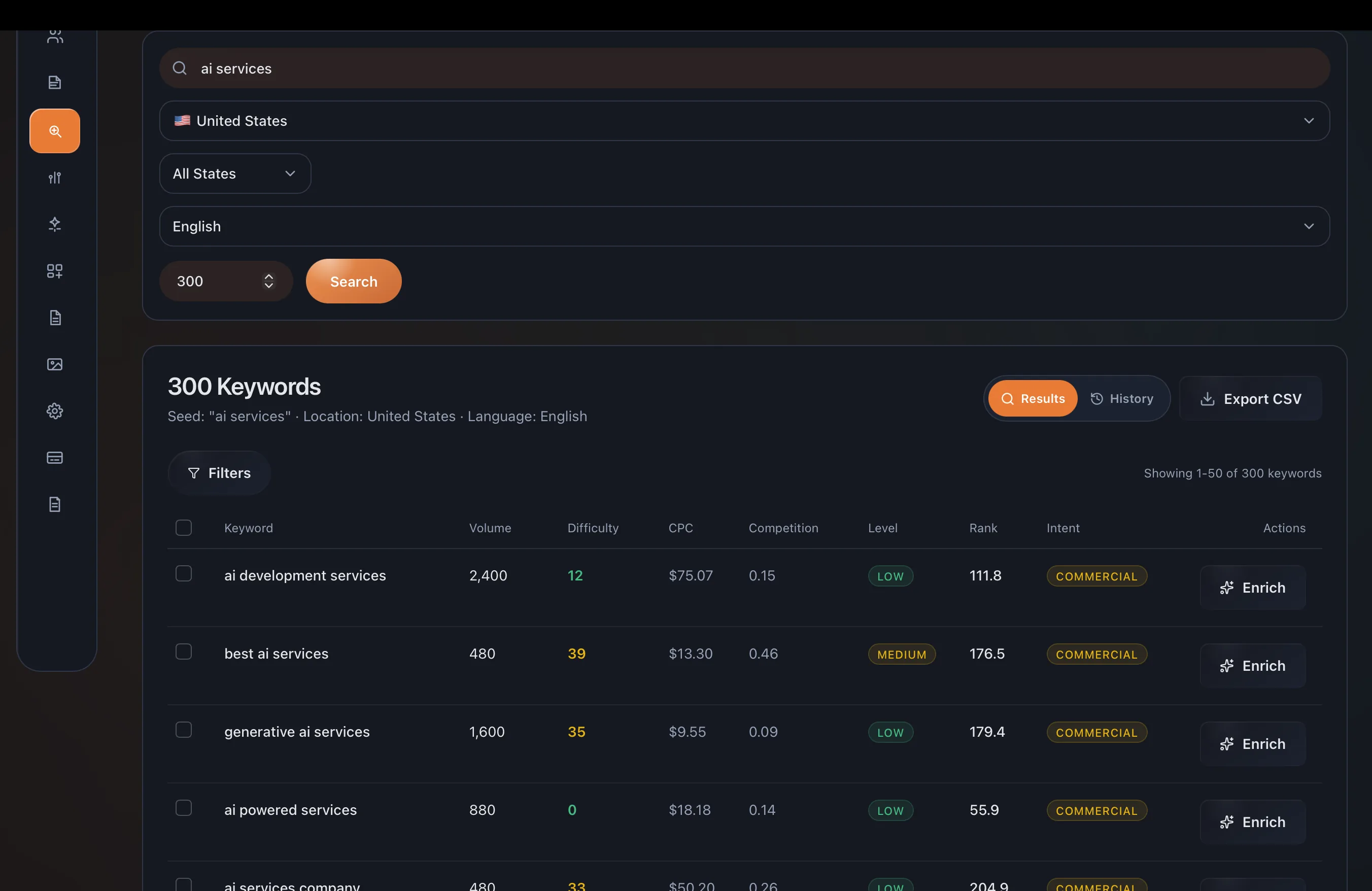
You're guessing which keywords to target
Enter a seed keyword → get 300+ ranked results with ROI data
300+ keywords in secondsVolume, difficulty, CPC, competition, and commercial intent: all in one view. Filter by location, language, and search intent. Sort by any column, export to CSV, and go from data to brief in one click.
“We used to spend a full day on keyword research per client. Now it's 20 minutes.”
: Daniel Brooks, Content Director, Northline Media
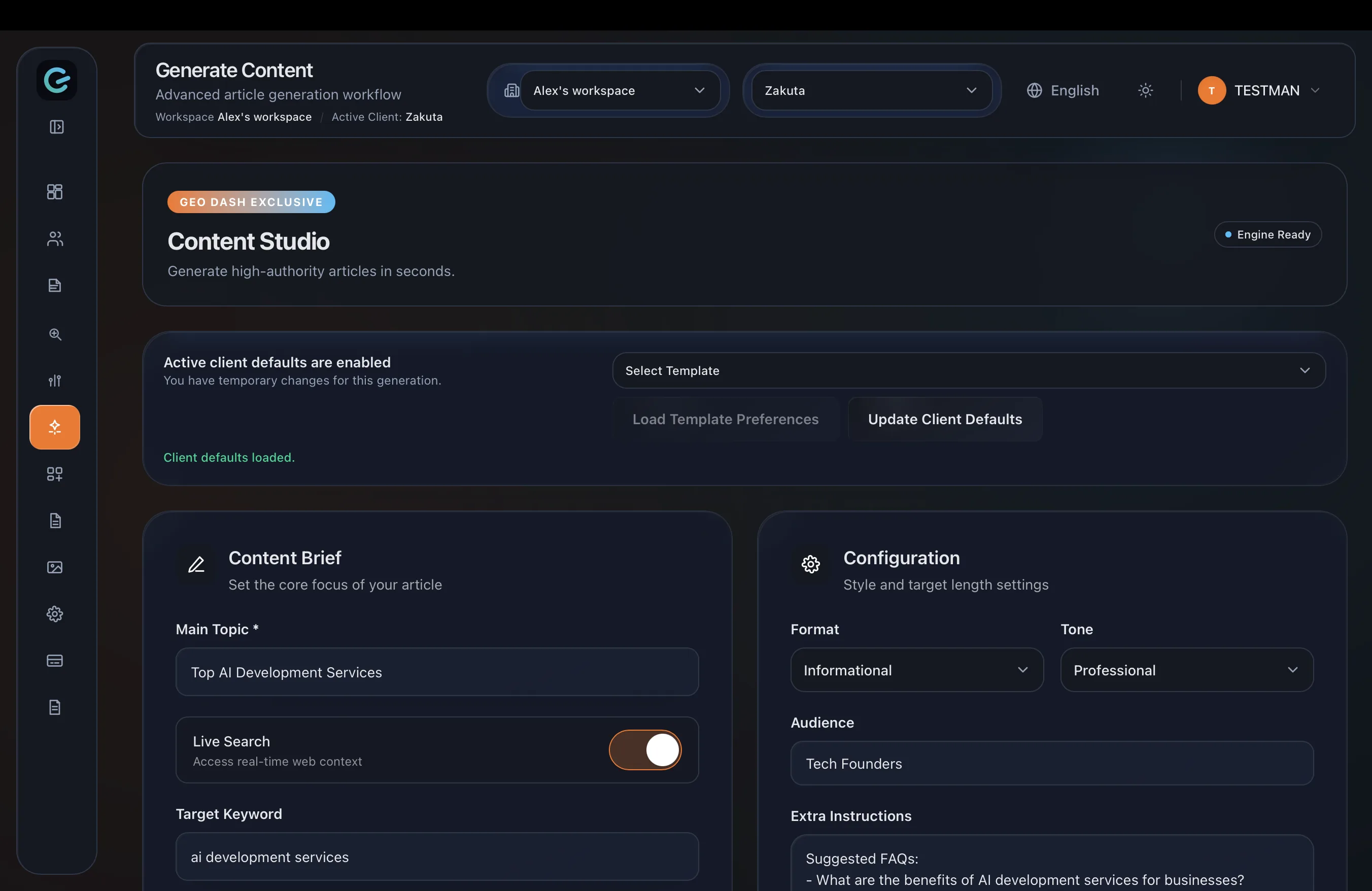
Writing one article takes you 6 hours
Set the topic → watch it build in real time → export
50+ articles/hrSet your topic, target keyword, tone, audience, and format: the Content Studio handles the rest. Each article ships with proper heading hierarchy, internal link suggestions, and structure built from SERP analysis. Export as Markdown or HTML and publish to any CMS.
“I used to spend 4 hours on a single client blog post. Now my team produces 15 per week.”
: Sarah Jenkins, Founder & CEO, Velocity Agency
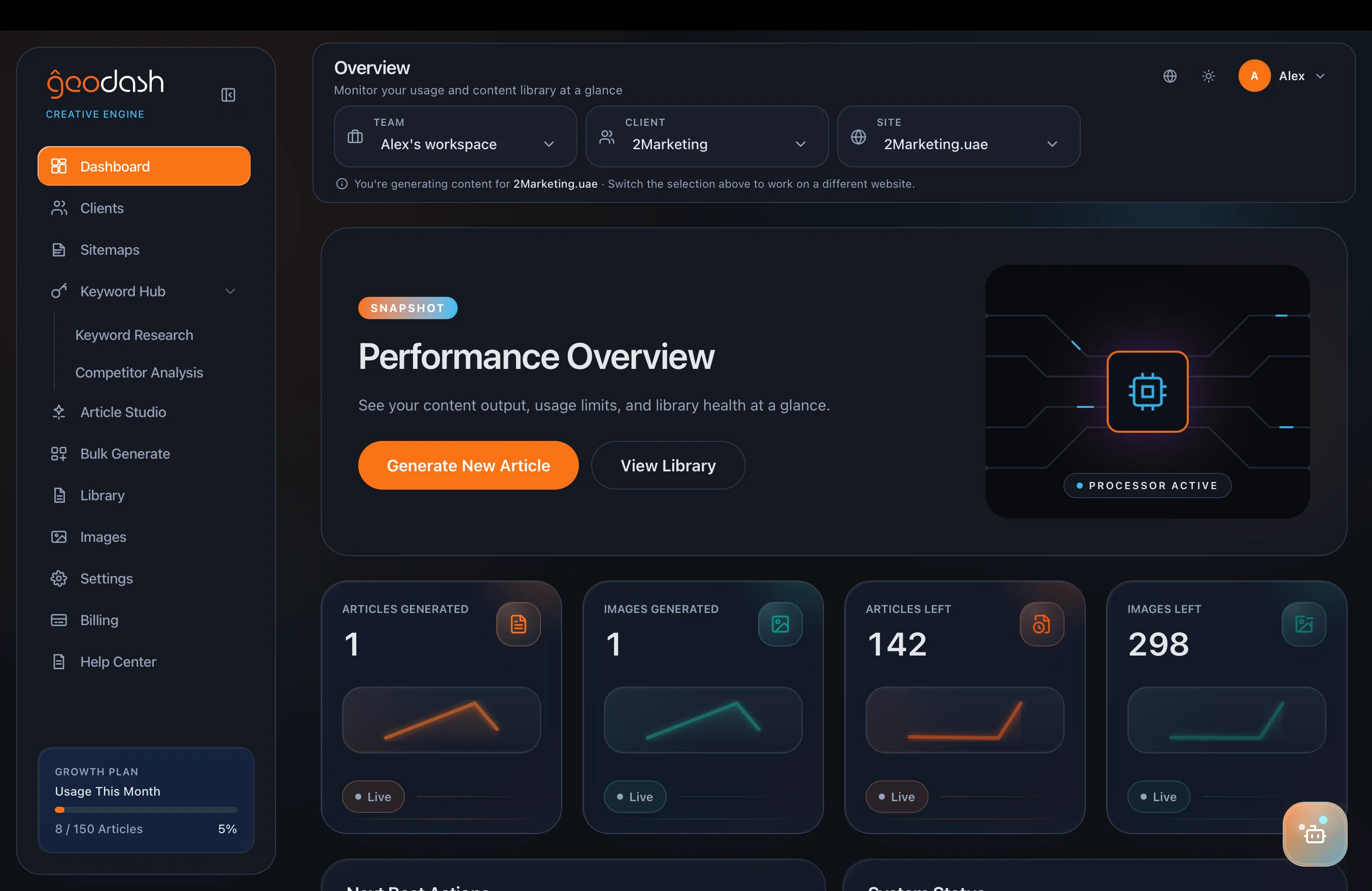
Your content is scattered and you can't see the big picture
One dashboard → every client, every article, every metric
All clients, one viewSwitch between client workspaces in one click. See performance at a glance: usage stats, content velocity, SEO scores, and publishing status. Each client's brand voice, keywords, and content stay completely isolated: no crossed wires.
“We manage 12 clients and Geo Dash cut our content fulfillment time by 40%.”
: Sarah Jenkins, Founder & CEO, Velocity Agency
Everything that’s included
No hidden features. No “contact sales to learn more.” Here’s the full list.
Research & Strategy
- AI keyword clustering (300+ results per search)
- Search volume, difficulty, CPC & competition data
- Commercial intent scoring
- Enriched content briefs with SERP gaps
- Questions-to-answer extraction
- Article angle recommendations
- Geo-targeted keyword filtering (location, language, state)
Content Generation
- AI long-form article generation
- Bulk generation (up to 50 articles per batch)
- SERP-aware heading structure
- Internal link suggestions
- Brand voice matching per workspace
- Tone, format & audience controls
- Content templates
Publishing & Export
- WordPress direct integration
- Markdown & HTML export
- Editorial review flow with status tags
- Approval gates before publishing
- Client review access (view-only or editor)
Assets & Library
- Content library with SEO scores & word counts
- Organized folders and archiving per client
- AI-generated context-aware article images
- Performance dashboards
- One-click export for deliverables
Team & Client Management
- Multi-client workspaces (isolated)
- Client brand voice profiles
- Role-based team permissions
- Workspace-level keyword lists & libraries
- One-click client switching
Built for your exact workflow
One operating system, three completely different use cases. See yourself?
Agencies managing 5+ clients
“Drowning in disconnected tools and client content chaos”
Multi-workspace isolation, bulk generation, client brand profiles, approval gates: manage 20 clients like 2.
In-house SEO teams
“Spending more time coordinating than creating”
Keyword hub, enriched briefs, internal linking, team permissions: one source of truth for your content pipeline.
Solo consultants & creators
“Doing the work of 3 people with zero margin left”
AI article generation, keyword clustering, image automation, 1-click export: multiply your output without hiring.
Teams that made the switch
“Geo Dash replaced scattered content tools with one structured workflow. We ship SEO pages in days, not weeks.”

Ayesha Khan
Head of Growth, Orbit Commerce
“The keyword-to-blog pipeline is the cleanest we have used. Editorial quality stayed high while production doubled.”

Daniel Brooks
Content Director, Northline Media
“We manage 12 clients and Geo Dash cut our content fulfillment time by 40%. Batch generation across isolated workspaces is exactly what we needed to scale.”

Sarah Jenkins
Founder & CEO, Velocity Agency
What’s coming next
The operating system is actively growing. Lock in current pricing before these ship.
Search Intelligence
Google Search Console, Google Analytics, rank tracking, content decay alerts, and refresh recommendations in one client view.
AI Quality & Cost Controls
Standard, Premium, and Ultra generation levels with plan-aware quotas and premium usage controls.
Agency Reporting
Automated and white-label SEO reporting with richer client collaboration and approval visibility.
GEO & Discover Optimization
Optimization guidance for AI answer engines and Google Discover alongside traditional search workflows.
Start with a focused free trial
1 client workspace · 2 articles/month · 1 image/month. No credit card required. Upgrade when you need higher limits and agency workflows.
Common questions
How long does it take to generate an article?
Bulk generation processes articles in parallel: 50+ per hour. A batch of 20 takes roughly the same wall-clock time as a single article.
Do I need technical skills to set up workflows?
No. Most workflows can be configured from templates and adjusted with simple form fields and step controls. Workspace setup takes under 2 minutes per client.
Can I connect my publishing stack?
Yes. Articles can be exported as Markdown or HTML for any CMS. WordPress publishing is available on Growth Agency, Agency Max, and Enterprise plans.
Will the AI match my client's brand voice?
Each client workspace stores its own brand voice, tone, and formatting defaults. These are applied automatically to every article generated in that workspace: no manual configuration per article.
Can clients log in to approve content directly?
Yes. Growth Agency, Agency Max, and Enterprise support client review workflows. Drafts move through review stages with status tags so nothing publishes before editorial sign-off.
How accurate is the keyword research data?
Keyword data includes search volume, difficulty, CPC, competition score, and commercial intent pulled from established data sources. You can filter by location, language, and state for geo-targeted campaigns.
Generate your first article free
N/A no card required
Pick any keyword, watch it build in real time, and export it. If it doesn't impress you, walk away with the content.
No credit card required · Cancel anytime · Upgrade when you are ready